Are you having trouble getting into Carers Victoria’s online workshops?

We have moved from using Zoom to MS teams because this is a much more secure way of running online workshops.  However, a very small number of carers might have difficulty getting in because of processes or settings on your computer or phone.

We understand that this can be frustrating, and it’s very important to us that you can come along to a workshop that is designed to assist you.  We are advised that most of the problems experience will be related to the browser or internet connections or If you have experienced problems.  So, we have put together the following info that we hope will help.

You will need to download the FREE Microsoft Teams app

  • Visit the Microsoft Teams website: microsoft.com
  • Download the app: Choose the appropriate version for your device from the Microsoft website or your device's app store
  • Install the app: Run the downloaded executable to install Microsoft Teams on your device
  • Log in: Use your email to set up your account


You will need to be connected to the internet

If you are on your computer and your internet is not stable, you will keep dropping out of the meeting. If this is happening for you try:

  • Closing all other programs on your device
  • Turning off your camera
  • Restarting your computer
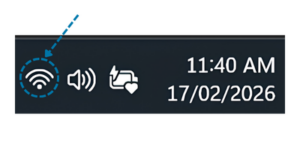
  • Check your network connection status, by scrolling and selecting the network, sound or battery icons, next to the date

Make sure the Wi-Fi is turned on.  You can check if your network name shows Connected below it.

If it displays a status other than Connected, select a Wi Fi network you recognize from the list of available networks.  Then, click on the network and attempt to connect.
If you are on your phone – look for the network icon and the number of bars you have showing. You’ll find this at the top, right-hand corner of your screen. 
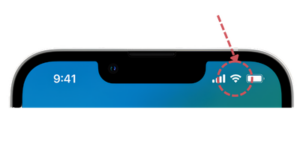
If this is not stable (only one or two bars) try:

  • Moving to another place in your house to improve the connection and get more bars
  • Turning the phone on and off again


Joining a Microsoft Teams meeting

Make sure you have the meeting link in the calendar invite (avoid forwarding). THIS IS ESSENTIAL
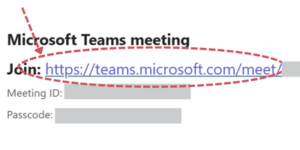
  • Click the blue link
  • Press ‘Join now’
  • Wait for the host to admit you
  • If this doesn’t get you into the meeting, try copying your link directly into your browser (like Microsoft Edge and Google Chrome)


It is best to have the app downloaded onto your device before the meeting. You can find it in the same way you find other aps on your phone for example.

Alternatively, you can join by using a web browser like Microsoft Edge and Google Chrome.

Make sure your web browser is the latest/updated version

If this doesn’t work, try:

  • A different browser
  • Clear the cache (deleting tabs from your browser history) and try again

Other trouble shooting ideas

To understand more about MS Teams visit the help site Microsoft Teams help & learning


  • Check that your microphone is on
  • Check your microphone permissions in ‘Settings’
  • Choose the correct device in ‘Device settings’ that matches the headphones or the computer/phone microphone that you are using.
  • Try leaving the meeting and rejoin
  • If all of this doesn’t work, try restarting your computer
  • Check that your camera is on
  • Check if you have any other programs open that might be using your camera and turn them off
  • Try restarting your computer

If all else fails, you are very welcome to stay without your camera.

If all else fails

Use the phone in option by dialing the number in the calendar meeting invitation.

If you manage to get into the meeting, you can still communicate with us by clicking the speech bubble icon usually across the top of your screen (the chat).
You can also send us an email at events@carersvictoria.org.au

The image shows the Aboriginal flag, with a horizontal black stripe on top, a red stripe on the bottom, and a yellow circle in the center.The image is of the Torres Strait Islander flag, featuring green horizontal stripes at the top and bottom, a blue field with a white Dhari (headdress) in the center, and a white star beneath the Dhari.
Carers Victoria acknowledges the Traditional Owners of the land on which our offices are located, the Wurundjeri peoples of the Kulin Nation, and pay our respect to Elders past and present. We acknowledge the continuing connection to land and waters. Sovereignty was never ceded.